
Overview #
Registrants can add tickets from several events to one cart and check out once.
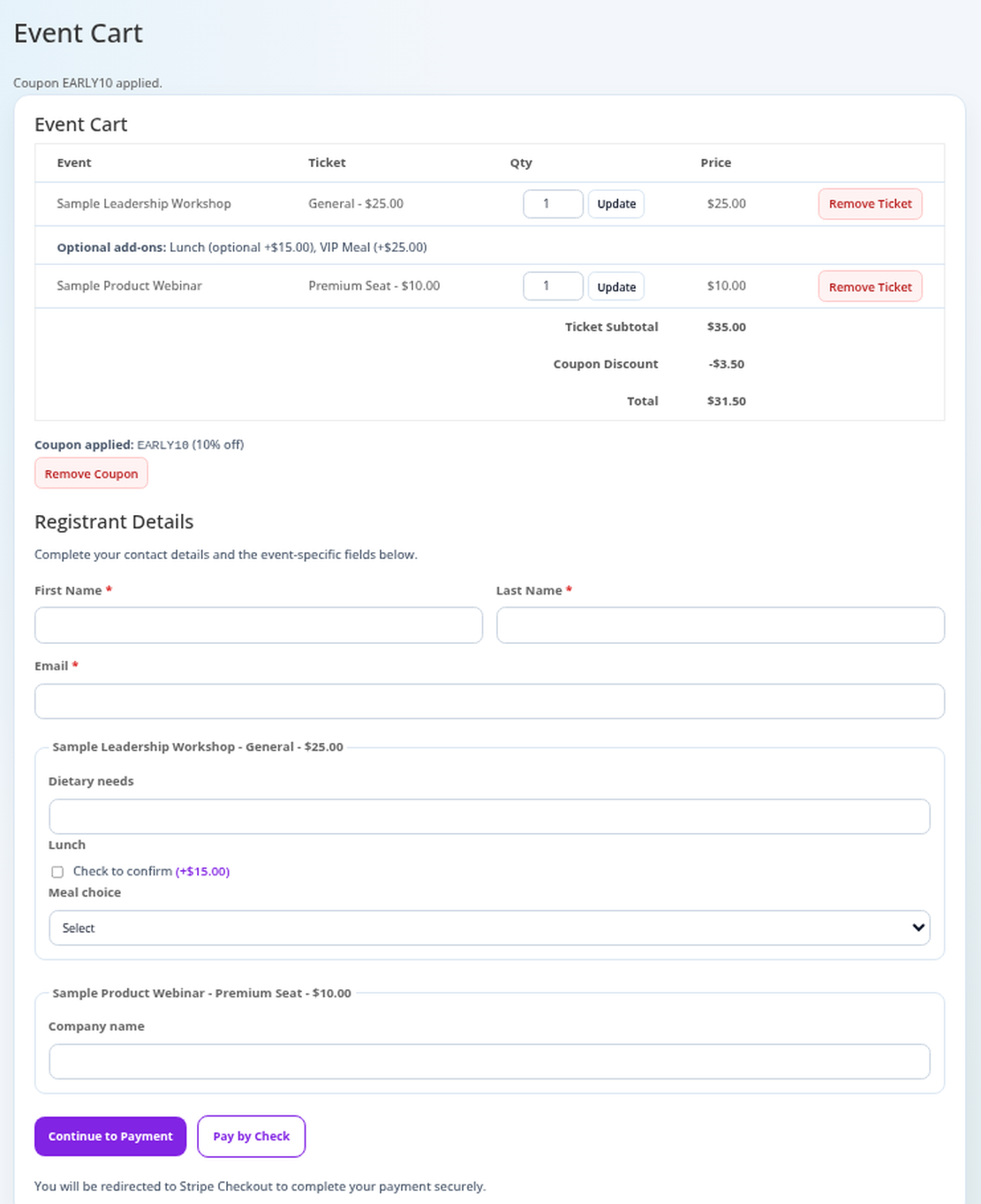
Steps for Registrants #
- On an event page, choose a Ticket Type and click Add To Cart.
- Open Checkout, adjust quantities or remove tickets, and apply a coupon.
- Enter first name, last name, email, and any event questions.
- Click Continue to Payment (card, via Stripe), Pay by Check (if allowed), or Complete Registration (free orders).
After Payment #
- Paid: “Payment successful. Thank you for registering!”
- Cancelled: “Payment was cancelled. No charge was made.”
- Still processing: They get a confirmation once Stripe finishes.
Unfinished Payments #
If someone starts card payment but never finishes, the pending registration is removed after about 30 minutes, freeing the tickets.
Best Practices #
- Link the Event Cart page in your menu.
Troubleshooting #
- “Online payment is not configured.”: Add Stripe keys in Settings.
- “Payment is unavailable while an event in your cart is unpublished.”: Publish the event.
- “There are not enough tickets left”: Stock ran out during checkout.
That’s it, dawg!


