
Overview #
A ticket type is something people can register for, such as “General Admission” or “Member Rate”.
Where to Find It #
Edit an event and scroll to Ticket Types.
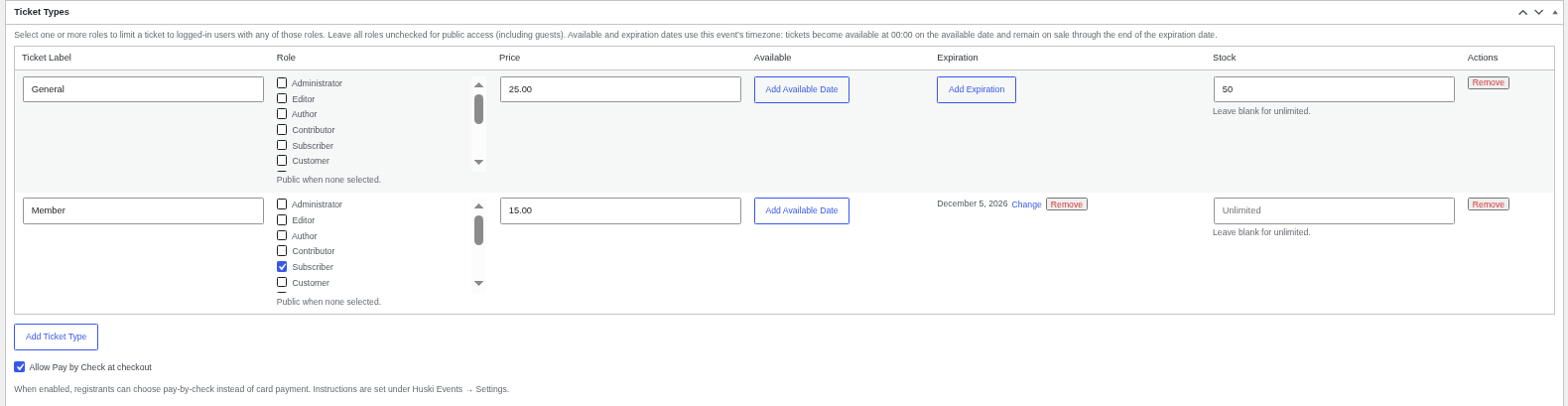
Ticket Options #
- Ticket Label: The name buyers see.
- Price: Use 0 for free tickets.
- Role: Leave unchecked for everyone (including guests). Tick roles to limit the ticket to logged-in users with those roles.
- Available: Optional on-sale date (starts at midnight in the event’s time zone).
- Expiration: Optional last day of sale (through the end of that day).
- Stock: How many can be sold. Blank means unlimited.
- Allow Pay by Check at checkout: Lets buyers choose to pay by check instead of card.
What Buyers See #
- Sold-out, expired, or not-yet-on-sale tickets cannot be added.
- If no tickets are available to them: “No ticket types are available for your account on this event.”
Choosing Which Roles Appear #
In Huski Events > Settings > General, Ticket Type Roles controls which roles show in the Role picker.
Best Practices #
- Use an expiration date for early-bird pricing.
- Set stock to your venue capacity.
Troubleshooting #
- “This ticket type is sold out.”: Raise the stock or add another ticket type.
- A role is missing from the Role list: Tick it under Ticket Type Roles in Settings.
That’s it, dawg!


